Achievement Unlocked
Lang verschollenen Tux gefunden
Der Geist der CLT2026 lebt! 🐧✨
Anyone who wears a smartwatch daily knows: the watch face is the most critical interface on your wrist. At a quick glance, it needs to deliver the exact information you require—clean, reliable, and aesthetically pleasing.
That is precisely where my frustration began. On my previous watch face, numbers in the complications were frequently truncated, cut off, or simply unreadable. Furthermore, none of the off-the-shelf watch faces reflected what truly defines my everyday life and hobbies: a fusion of amateur radio (my callsign DO3EET), my enduring love for Japan, and the distinct terminal visual identity of this blog.
So I made a decision: if the perfect watch face doesn’t exist, I’ll build it myself from scratch. The result is Dream of Japan · Torii GMT for the Google Pixel Watch—crafted using Google’s modern, purely declarative Watch Face Format (WFF v2).
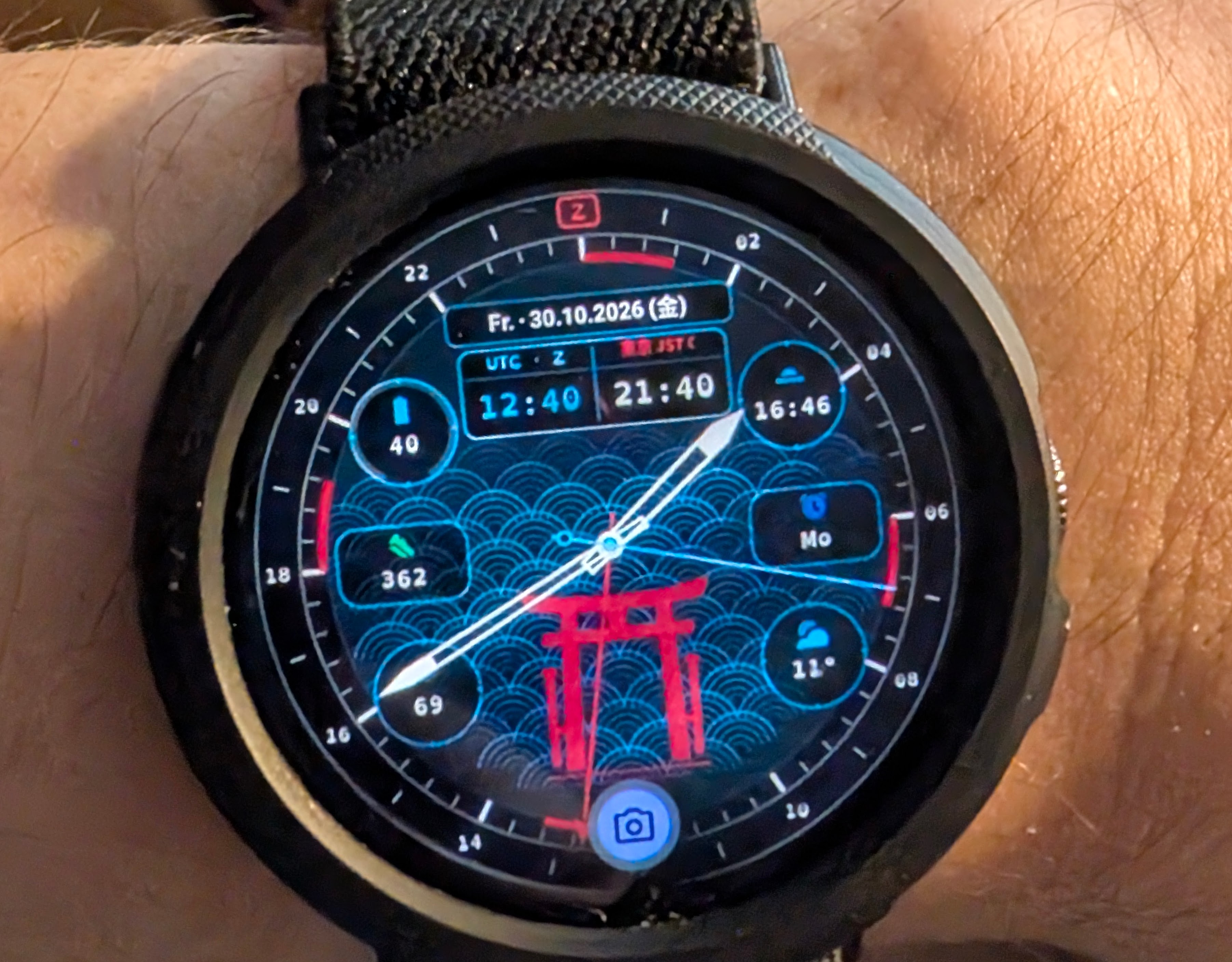
A cookie-cutter watch face was never going to cut it. I wanted a full-fledged GMT and radio room timepiece, combined with Japan travel utility and blog-inspired aesthetics.
Z): Positioned at 24/00 hours is the Z crown for Zulu time (UTC). A prominent red 24-hour arrow hand sweeps the dial once a day, continuously indicating current UTC on the bezel—an absolute essential for logging contacts and tracking band openings.00–03, 15–18, 30–33, and 45–48) are subtly highlighted—a nod to traditional maritime radio room clocks.Asia/Tokyo, JST). A dynamic day/night indicator (☀ / ☾) for Tokyo is already prepared in the XML expressions, but isn’t visible in the current rendering yet and remains on the to-do list.日, 月, 火, 水, 木, 金, 土).OpenDyslexicMono, matching this blog, subtly overlaid with horizontal CRT scanlines.With Wear OS 5, Google made the new Watch Face Format (WFF) the required standard for efficient watch faces. WFF relies entirely on declarative XML (hasCode="false" in the Android manifest)—meaning no custom background Java or Kotlin services are running, resulting in outstanding battery efficiency.
However, anyone assuming declarative XML is simple will quickly encounter the strict quirks of the Wear OS runtime. Here are the four biggest challenges I solved during development:
The Wear OS DeclarativeWatchFaceRuntime parses XML with strict validation. Syntax discrepancies often lead to silent failures or dropped components:
<ComplicationSlot> Must Be a Direct Child of <Scene>: It is tempting to group complication slots inside <Group> elements for easier layout transforms. However, the runtime will ignore them unless every <ComplicationSlot> is placed directly under <Scene>!<BoundingRoundBox cornerRadius="14">. Writing <BoundingRoundRect> causes the parser to discard the slot immediately.<Localization> element must be specified inside <DigitalClock>:<DigitalClock x="228" y="99" width="82" height="42">
<Localization timeZone="Asia/Tokyo" />
<TimeText format="hh:mm" hourFormat="24" align="CENTER">
<Font family="opendyslexic_mono" size="13" color="#C0CAF5" weight="BOLD" />
</TimeText>
</DigitalClock>
Note: <TimeText> format strings must be strictly lowercase (format="hh:mm").
Building a WFF watch face does not require launching Android Studio with gigabytes of Gradle daemon overhead and Kotlin compilers. Because WFF contains no compiled code, the entire APK can be packaged directly using the Android SDK build tools in under two seconds!
My build script build_apk.sh executes the entire pipeline synchronously:
#!/usr/bin/env bash
set -euo pipefail

SDK_DIR="${ANDROID_HOME:-$HOME/Android/Sdk}"
BUILD_TOOLS="$SDK_DIR/build-tools/36.1.0"
PLATFORM_JAR="$SDK_DIR/platforms/android-36/android.jar"

# 1. Render dial and hand assets
python3 ./scripts/generate_assets.py

# 2. Compile Android resources with aapt2
"$BUILD_TOOLS/aapt2" compile --dir ./app/src/main/res -o ./build/compiled_res/

# 3. Link APK package (de.dreamofjapan.watchface)
"$BUILD_TOOLS/aapt2" link \
    -I "$PLATFORM_JAR" \
    --manifest ./app/src/main/AndroidManifest.xml \
    --min-sdk-version 33 \
    --target-sdk-version 36 \
    --auto-add-overlay \
    -o ./build/unaligned.apk \
    ./build/compiled_res/*.flat

# 4. Zipalign & Sign
"$BUILD_TOOLS/zipalign" -f -p 4 ./build/unaligned.apk ./build/aligned.apk
"$BUILD_TOOLS/apksigner" sign --ks ./build/debug.keystore --out ./dist/dreamofjapan-torii-gmt.apk ./build/aligned.apk
In less than two seconds, a fully signed, production-ready APK is waiting in the dist/ directory.
On the 450×450 pixel OLED screen of the Pixel Watch Gen 4, any pixelation on fine graduation marks or concentric curves is immediately visible.
Rather than drawing assets manually in vector software, a Python script (generate_assets.py) generates all layers mathematically using polar coordinate transformations:
# 4x Supersampling: 1800x1800 px internal canvas -> Lanczos downsampling to 450x450 px
SIZE = 450
SCALE = 4
SS = SIZE * SCALE

def polar(angle_deg: float, radius: float, cx: float = 225.0, cy: float = 225.0):
    rad = math.radians(angle_deg - 90.0)
    x = cx + radius * math.cos(rad)
    y = cy + radius * math.sin(rad)
    return int(round(x * SCALE)), int(round(y * SCALE))

def downsample(img: Image.Image) -> Image.Image:
    return img.resize((SIZE, SIZE), Image.Resampling.LANCZOS)
By rendering on an 1800×1800 canvas and downsampling via Lanczos filtering, all tick marks, curves, and numerals appear razor-sharp on the watch face.
Connecting a smartwatch via physical USB is not an option on the Pixel Watch due to its wireless charging cradle. Fortunately, Wear OS supports Wireless Debugging.
Because smartwatches can frequently change local DHCP IPs on home routers, I use a straightforward trick:
_adb-tls-connect._tcp), ADB reconnects instantly without needing a new pairing code:# Connect and deploy APK in one step
adb connect "$WATCH_IP:$WATCH_PORT"
adb install -r ./dist/dreamofjapan-torii-gmt.apk
In under 10 seconds, the updated watch face is live and running on the wrist.
The watch face came into being just today and has only been on my wrist for a few hours—still practically fresh from the compiler. Via the watch settings, four distinct themes (Tokyo Night Terminal, Miyajima Vermilion, Neo-Tokyo Cyber, and JDM Field), alternative date layouts, and hand modes can be changed on the fly.
Of course, a DIY project like this is never truly 100% finished. As mentioned, the skeletonized hands are still an active work in progress—when the minute hand parks directly over a digital digit, reading it still takes a bit of guesswork. But the foundation is rock solid, and subsequent iterations are only a quick Python tweak and an ADB deployment away.
What pleases me most: it works seamlessly in daily life. No more truncated numbers in complication frames, instant access to UTC for ham radio, a quick glance at Tokyo that brings back great travel memories—and the distinct satisfaction of wearing a timepiece crafted entirely to your own vision.
Lang verschollenen Tux gefunden
Der Geist der CLT2026 lebt! 🐧✨
Ich bin Frank. Ein Informatiker und Funkamateur aus Deutschland. Außerdem reise ich gern nach Japan.
By Frank Tornack,
Screen Burn-In
Glückwunsch! Deine Pixel sind jetzt offiziell eins mit meiner Website. 📺✨